


Orders and inventory management
-

Ongoing WMS integration for warehouse, picking and packing
28 Nov 2025
Abicart is designed to integrate seamlessly with external systems to automate and manage complex warehouse and logistics processes, directly supporting your growing e-commerce business.Centralized Order and Inventory Management By connecting Abicart with an external Enterprise Resource Planning (ERP) or business system, you ensure that every part of your order fulfillment process is synchronized. This capability is essential for efficient warehouse operations: Order Flow: Orders placed in your webshop can be automatically transferred to your business system (such as Fortnox or Specter) to initiate the picking and packing workflow. Inventory Accuracy: Real-time synchronization of stock balances means your inventory on the webshop is always up-to-date, minimizing the risk of overselling and ensuring accurate stock for your warehouse team. Seamless Labeling: Integrations with Transport Administration (TA) systems like nShift (formerly Unifaun) and Shipmondo automatically manage shipping details, generate freight labels, and facilitate the creation of customs documents for international shipments. This integration capability ensures that as soon as an order is completed, the necessary data is immediately available to your warehouse management system or personnel, making the transition from order placement to shipping a fast, organized, and reliable process. Furthermore, developers can utilize the flexible Abicart API to create custom connections for specialized warehouse management (WMS) or third-party picking and packing applications, allowing for a truly tailored logistics solution for your specific needs.
-

Accounting integrations with Fortnox, Visma, Business Central, Specter and more
28 Nov 2025
Abicart provides integrated connections with leading business and financial systems, including **Fortnox, Visma eEkonomi, Visma Administration, Specter, BL Administration**, and others. These integrations are designed to automate and simplify your e-commerce financial processes, allowing you to manage orders, customers, products, and inventory with efficiency.The ability to connect your webshop to an Enterprise Resource Planning (ERP) or accounting system is one of the key benefits of the **Abicart PRO** subscription, making it a cost-effective solution for comprehensive business management. Key Advantages of Financial Integrations Automated Data Transfer: Transfer new orders, customers, and product information directly from Abicart to your chosen financial system on an ongoing basis. This significantly reduces manual data entry and minimizes the risk of errors. Synchronized Inventory and Pricing: Ensure accuracy across all sales channels. You can configure the integration to automatically update stock balances and prices in your webshop with the latest data retrieved from your ERP system. Centralized Customer Management: Customer records can be transferred, allowing you to manage and update customer information in a single, reliable system. Simplified Accounting: Orders are booked in your financial system as invoices, cash invoices, or orders, depending on the payment method used, streamlining the reconciliation process. Integration Features at a Glance Depending on the chosen system, the integration can support a variety of features: Functionality Benefit Order Export New orders placed in Abicart are automatically sent to your accounting system (e.g., Fortnox, Specter) for invoicing and processing. Product & Price Export/Import Transfer product details and prices between systems. This ensures your webshop always reflects the correct, up-to-date catalog information. Stock Status Synchronization Inventory changes, whether from a webshop order or a POS system (like Northmill Flo), are synchronized to maintain accurate stock levels in both systems. Customer Record Transfer Customer information is transferred, preventing duplication and ensuring a consistent customer register. When selecting a system for integration, consider whether the primary source for managing your inventory and product information will be Abicart or the external ERP system to ensure the event settings (e.g., immediate update, scheduled periodic updates) are correctly configured for a seamless workflow.
-

Sales and inventory statistics and reports
28 Nov 2025
Abicart provides robust features for collecting and utilizing sales and inventory data, giving you the insights needed to manage your online shop effectively. Accurate data helps you make informed decisions about your product range, marketing efforts, and overall business strategy.Order and Sales Data All orders placed in your shop are listed under the "Orders" section in the admin interface. You can customize which columns of information are displayed to tailor the view to your needs. Key features for data analysis and management include: Filtering and Searching: Easily search for orders by dates, payment methods, countries, or specific order numbers to find exactly the data you need. This allows for quick insights into sales trends or specific customer behaviors. Exporting Orders: Orders can be exported to a text file (CSV or SKV format) for use in other systems or for advanced analysis. You can export all orders or a filtered selection, such as orders within a specific date range. Abandoned Carts: The "Abandoned carts" feature lists orders that customers started but did not complete, provided they entered an email address. This information can be filtered by time period (day, week, month) and can be used for follow-up marketing initiatives. Inventory Management and Monitoring Effective inventory tracking is essential for keeping products available and ensuring a smooth customer experience. Abicart offers tools to monitor and manage your stock, helping to prevent overselling and streamline restocking efforts. Stock Balance: You can enable inventory management and set the stock balance for your products and their variants. This information can be displayed to customers on the product page. Low Stock Alerts: Set up email alerts when a product's stock falls below a specified limit, ensuring you are notified when it is time to reorder or restock. Product Monitoring: Customers can monitor out-of-stock products if the feature is enabled. When the product is restocked, an automatic email notification is sent to all interested customers, helping to capture lost sales opportunities. You can track these watches in the admin interface. Integration with External Systems To centralize business intelligence and accounting, Abicart offers integrations with various external ERP and financial systems. These integrations automatically synchronize orders, customer data, and product information (including stock and price updates) between your online shop and your business management software. Accounting/ERP Systems: Integrations are available for platforms like Visma, Fortnox, and Björn Lundén's Administration to seamlessly transfer orders and product data for streamlined accounting and reporting. POS Systems: Integration with POS systems like Northmill Flo (formerly MoreFlo) allows for seamless synchronization of stock changes from in-store sales back to your webshop inventory, ensuring consistent stock levels across all sales channels. By leveraging these built-in and integrated features, you gain a clear overview of your sales performance and operational efficiency, empowering you to scale your e-commerce business confidently.
-

Shipping classes and partial deliveries
28 Nov 2025
Abicart offers robust features for handling complex shipping scenarios, ensuring a smooth process for both you and your customers. This capability is especially beneficial for managing diverse product ranges and dynamic stock situations.Handling Varied Product Types with Shipping Classes The system allows you to define different shipping classes to accommodate products with unique characteristics, like items that are physically large or heavy. You can utilize a "Bulky" tag for products that require specialized handling or restricted delivery methods. Mark a product as Bulky on its product page in the admin. Configure your delivery methods to either support all products, disable for bulky products, or explicitly enable only when the cart contains a bulky product. This ensures that if a customer has a bulky item in their cart, only the appropriate delivery methods (e.g., "Pick up in store" or a specialized carrier) are presented at checkout. Streamline Fulfillment with Partial Deliveries If an order contains multiple products and some are temporarily out of stock, Abicart's partial delivery feature allows you to fulfill the order in multiple shipments. This prevents delays for the items you currently have on hand, improving customer satisfaction. When an order needs to be split: You can create separate shipments directly from the order page in the administration. For each shipment, you specify the quantity of products being sent. Each shipment can then be individually marked as "shipped" and a tracking code added, with the remaining products marked as "unhandled" until they are ready to go. This function integrates with external systems like nShift and Postnord, provided the proper settings are activated in the respective delivery methods. For large volume operations, consider integrating with a Transport Administration (TA) system like nShift Delivery or Shipmondo, included with the Pro subscription, to automatically handle labels, customs documents, and tracking information.
-

Handling returns, complaints and refunds in admin
28 Nov 2025
Efficiently managing returns, complaints, and refunds is key to maintaining customer satisfaction and operational stability for your online shop. Abicart provides the tools within the admin interface to manage these processes smoothly, particularly when integrating with third-party payment solutions.Order Editing and Refunds The ability to handle returns and subsequent refunds is primarily facilitated through the order editing function, which is included in Abicart Plus and Pro subscriptions. If a customer returns a product or has a complaint leading to a refund, you can update the order directly in your Abicart admin. Partial Return/Refund: You can remove specific products from an order, and the stock balance will be adjusted automatically in Abicart. The order total is reduced, but generally, major changes (like increasing the total amount) are restricted, especially with third-party payment services. Full Cancellation/Return: To cancel an entire order and process a full refund, click the "Cancel" button on the order page. If the payment method supports it, a signal is sent to the payment service to cancel the order and trigger the refund. The stock balance is restored automatically. Manual Refunds for Third-Party Payments: For orders paid via a third-party service (like Klarna, Svea, Nets, etc.), if the cancellation signal fails, you might need to log in to the payment company's separate admin portal (e.g., Klarna Online) to manually process the credit/refund. You may also need to log in manually to refund the difference if you edit an order after it has been fully activated/charged, as increasing the order value is typically not permitted through the Abicart integration. By using the built-in order editing and cancellation features, you can ensure that product inventory is corrected and that the correct instructions are communicated to the relevant payment provider to handle the customer refund. Monitoring Stock and Communication When processing returns, your product stock levels are automatically reconciled when an item is removed from a placed order. This integration with stock management ensures product availability is kept accurate. For clear communication, always resend the order confirmation after editing an order to notify the customer of the changes and the updated order summary. It is important to check with your payment provider regarding their specific rules and procedures for handling refunds and cancellations, as Abicart's administration primarily transmits the instruction to the third-party service, which then executes the financial transaction.
-

Stock locations and internal stock transfers
28 Nov 2025
For merchants managing stock across different physical spaces, Abicart offers features to help keep track of where every product is located and how stock moves internally.Designate Stock Locations for Efficient Picking Every product can be assigned a specific storage location name directly within your admin panel. This simple tagging is highly valuable for improving efficiency during order fulfillment. [cite_start] Fast Location Lookup: Store the name of the storage location on the product itself[cite: 538]. [cite_start] Optimized Pick Lists: The stock location name is included in your system for easier sorting when generating picking lists[cite: 538]. This helps staff locate items quickly and minimizes picking errors. Maintain Accurate Records with Stock Management When coupled with Abicart’s robust inventory features, tracking stock location ensures that your digital records accurately reflect physical availability. [cite_start] Enable Stock Management: To utilize location tracking and manage availability, the "Enable stock management" setting must be active on the product[cite: 532, 588]. [cite_start] Manage Variants: If you use product variants (like size or color), the stock balance for each individual selection is managed on the "Customer selections" tab[cite: 532]. By effectively managing stock locations, Abicart provides the detailed internal visibility you need to speed up processing times, especially important for growing businesses with expanding inventories.
-
Pick lists and packing slips
28 Nov 2025
Efficient order fulfillment is crucial for any successful e-commerce operation. Abicart provides built-in tools to help streamline your warehouse processes with customizable picking lists and packing slips.Customizable Documents for Efficient Order Processing You have full control over the information displayed on your picking lists and packing slips, ensuring they meet the specific needs of your business. This customization helps your team quickly and accurately fulfill orders. Picking Lists: Select which order details should be included in the printout of the picking list to guide staff in gathering products efficiently. Packing Slips: Choose the properties to display in the printout of the delivery note, ensuring accuracy when preparing the package for shipment. Print Settings for Localization If you operate a multi-language store, Abicart allows you to set the language for your printed documents, offering flexibility based on administrative or customer preference. Administrator Language: Documents can be printed in the language selected in your admin's "My profile" settings. Customer's Language: Documents can be printed in the language the customer selected when the order was placed. By offering simple, customizable, and localized tools for generating these essential documents, Abicart helps you maintain professional documentation and accelerate your order management workflow.
-

Order confirmation emails
28 Nov 2025
An order confirmation is more than just a receipt; it is an important customer touchpoint that reinforces trust and professionalism. Abicart's platform provides tools to customize the content of order confirmations and other email communications sent to your customers.Customizing Email Content Under Settings > [cite_start]Document and Email Content, you can access the Email Content tab to tailor your communications[cite: 780, 781]. [cite_start] Order Confirmations: Select which specific properties and details you want to display on the customer’s order confirmation[cite: 781]. [cite_start]You can also add a custom text for important notices or thank you messages to be included in the email[cite: 781]. [cite_start] Receipts: Customize the properties shown on the customer's receipt, including adding your own supplementary text[cite: 782]. Delivery Confirmations: Activate automatic delivery confirmations. [cite_start]When an order is marked as sent in your admin, an email will be dispatched to the customer[cite: 782, 1047, 1406]. [cite_start]This confirmation can be especially valuable if you include the tracking number for package traceability[cite: 242, 243, 1410]. Delivery and Tracking Information Providing immediate tracking information is key to customer satisfaction. When an order is exported for automatic freight booking (e.g., via integration with Postnord or nShift), the tracking number is sent back to Abicart. [cite_start]When you subsequently mark the order as "sent," the tracking number can be automatically included in the delivery confirmation email (if activated)[cite: 242, 1410, 1450]. [cite_start]Even if you book transportation manually, you can enter the carrier and tracking number on the order page in the admin, and this information will be shared with the customer via their customer login on "My Pages"[cite: 241, 244, 246, 248]. [cite_start]You can guide the customer to log in to their account to find the "Track shipment" link[cite: 246, 247, 248]. Secure and Reliable Sending Abicart employs specific measures to ensure your order confirmations reach their destination reliably and are not flagged as spam: [cite_start] Return Address: By default, order confirmation copies sent to the store owner use a specialized return address (shop-orders@abicart.se) to minimize spam risks[cite: 786]. Sender Authentication: To bolster email deliverability and legitimacy, you can create and add an SPF (Sender Policy Framework) record in your DNS configuration. [cite_start]This explicitly authorizes Abicart to send emails on your behalf, reducing the chance of them being flagged as spam or phishing[cite: 795, 796, 805, 806]. [cite_start]For enhanced control, especially in multi-store systems, the language of the printouts, like picking lists and delivery notes, can be set to either the administrator's language or the customer's language used when placing the order[cite: 783, 784].
-

Customer registry and customer profiles
28 Nov 2025
The Customer Registry feature in Abicart Plus and Pro subscriptions is an invaluable tool for managing your customer relationships and enhancing the shopping experience.The Customer Registry: Your Central Hub While all customer details are saved on individual orders, the Customer Registry acts as a central hub for managing logged-in customers. It provides a straightforward overview, allowing you to: View Past Orders: Easily access a customer's complete purchase history. Manage Tracking Information: Logged-in customers can track their orders directly on "My Pages" if the order has a carrier and tracking number. Export Data: Export the entire customer list to a file for use in other systems or for analysis. Manage Consents: Keep track of which customers have consented to receive your newsletter. Customer Login and Personalization Enabling customer login, which is available in Abicart Plus and Pro, offers a more personalized experience: My Pages: Logged-in customers gain access to their own "My Pages," where they can review past orders and track shipments. Voluntary or Mandatory Login: You can choose to make login optional for most customers or mandatory for full store access. For business-to-business (B2B) shops that need to restrict the product range and pricing, mandatory login is a key benefit. Customer Segmentation: Link customers to specific Customer Groups to give them access to customized product ranges, tailored price lists, and unique payment methods. This is perfect for managing B2B clients, VIP programs, or different market segments. Managing New Customers The platform offers flexibility in how new customer accounts are created: Self-Registration: Customers can register their own accounts through an open process. Administrator Creation: For B2B sales or controlled access, you can close self-registration and instead create accounts manually for customers after they've submitted necessary details via a contact form. The Customer Registry simplifies your administrative tasks while giving you the tools to create highly segmented and personalized shopping experiences, ultimately helping to build long-lasting customer relationships.
-

Order management in admin: list, history, creation and editing
28 Nov 2025
Efficient order management is central to a successful e-commerce operation. The Abicart administration interface provides a comprehensive and user-friendly system for handling all orders, offering you full control from placement to delivery.Order List and Filtering The "Orders" section in the admin panel lists all transactions from your webshop. This clear overview allows you to: Customize the View: Select which columns of information you want to display for a quick, tailored summary of your order pipeline. Search and Filter: Easily search for specific orders by order number, date, or other criteria. You can filter the list to find orders placed with a particular payment method or destined for a specific country. Export Orders: Export a selection or all orders into a text file (CSV or SKV format) for use in external systems or for further analysis. Detailed Order View and History By clicking on any order number, you access the detailed order page. This single-page view aggregates all relevant information: purchased products, customer details, chosen payment and delivery methods, and, where applicable, the export status to integrated logistics or finance systems. For logged-in customers, this information is also accessible on "My Pages" as part of their order history, enabling them to track shipments and review past purchases. Order Creation and Quotes For business-to-business (B2B) sales or direct customer inquiries, Abicart supports the creation of manual orders and quotes directly within the admin panel (available in PLUS and PRO subscriptions). Create New Orders: Easily create an order by selecting currency, language, payment/delivery methods, and manually adding customer details and products from your existing assortment. Quoting System: Utilize the "Quotes" feature to create an order confirmation for a customer to approve. You can edit the quote, including adding or removing items and changing prices, before it is finalized and marked as paid. Activation and Debiting for Seamless Payment Flow For most external payment methods (such as Klarna, Swedbank Pay, and others), the payment is initially reserved when the customer checks out. To complete the transaction and receive your funds, you need to "activate" or "debit" the order when it is ready to ship. This is quickly done: One-Click Activation: Activate an order directly from the main order list using a lightning bolt icon, which typically marks the order as paid and shipped simultaneously. Action Control: On the detailed order page, use the "Perform Action" box to select whether to mark the order as paid, create a shipment, or both, giving you precise control over the fulfillment process. Flexible Editing and Partial Delivery The order editing functionality (available in PLUS and PRO subscriptions) provides the flexibility needed for real-world scenarios like returns or changes. Edit Details: Modify items, shipping fees, VAT settings, and delivery methods. While third-party payment rules may restrict increasing the order value, you can easily reduce it. Partial Delivery: If an order contains products with varying stock statuses, you can split it into multiple shipments. The system manages the creation of separate shipments, facilitating the export of tracking details for each package. With Abicart's centralized and feature-rich order management system, you maintain full operational control, minimize manual errors, and ensure a professional experience for all your customers.
-

Connecting your online store with your physical store
28 Nov 2025
For businesses operating with both an online shop and a physical storefront, seamless integration between the two is the key to effortless management and maximum efficiency. Abicart provides direct, ready-made connections to leading Point of Sale (POS) and Enterprise Resource Planning (ERP) systems, allowing you to synchronize your entire business operation.This powerful connectivity eliminates the burden of manual double-entry and ensures your data is always consistent across all sales channels. Achieve True Omnichannel Synchronization Integrating your webshop with a business system means your e-commerce platform and physical store systems communicate with each other automatically. This collaboration delivers significant advantages: Real-Time Stock Control: Instantly synchronize inventory levels between your online and physical stores. A product sold in your brick-and-mortar shop is immediately reflected as a stock deduction online, preventing frustrating over-sells and ensuring accurate availability for your customers. Centralized Product and Pricing: Manage product information, including articles and price changes, in one primary system—either your Abicart admin or your ERP/POS system. Updates are automatically pushed across all channels, ensuring consistent naming, specifications, and prices for your products whether a customer shops online or in-store. Streamlined Order and Customer Management: When an order is placed online, it is automatically transferred to your business system. This immediate transfer reduces the risk of administrative errors, simplifies invoicing and accounting, and provides a centralized place for monitoring all sales and revenue. Customer records can also be synchronized, ensuring loyalty programs and purchase histories are consistent. Enhanced Customer Experience: By integrating systems, you create a more transparent and reliable shopping experience. Customers benefit from accurate stock availability and faster, more efficient order processing. Integrated Partners Abicart offers pre-built, seamless integrations with several major business systems, including: POS/Cash Register Systems: Partners like Northmill Flo offer ready integration specifically designed to connect your Abicart webshop with your physical store's cash register, synchronizing products, stock balance, prices, customers, and orders in both directions. ERP/Accounting Systems: Integrations with systems like Specter, Fortnox, Visma Administration, Visma eEkonomi, and BL Administration automate key back-office workflows such as handling orders, managing inventory, and accounting. By leveraging one of these integrations, you minimize manual data handling, save time, and dramatically reduce the risk of costly mistakes, freeing you to focus on growing your business.
-
Shipping package templates
28 Nov 2025
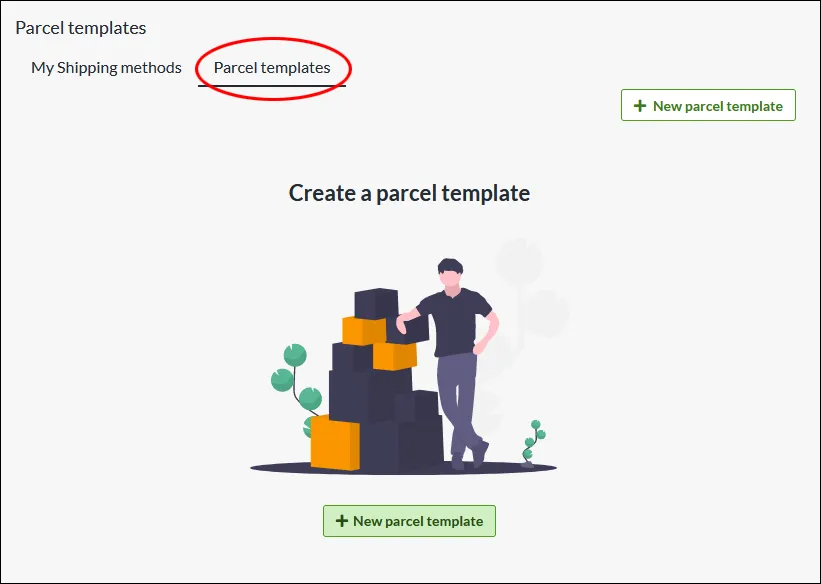
Create templates for the packaging with which you send your orders. Enter the weight and dimensions on the package template, which is then calculated into the total weight of the order.What is a parcel template? If you have different sizes of packaging that you send your orders in, you can create different templates for this which are then included in the total weight. Do I have to create parcel templates? Some integrations, like Shipmondo, require that you have a parcel template for the delivery methods. Otherwise, this is an optional feature to use. Create a parcel template Under Settings -> Shipping there is a tab at the top called "Parcel templates". Click on "New parcel template" NameChoose a descriptive name, this is only shown to administrators. WeightThe weight of the package, combined with the products, will be the total weight of the shipment. Type of packageSelect the type of package... DimensionsChose unit. Millimeter is default. In this example, we add "Standard carton" as name, the weight to 100 grams, type "Package", width 400mm, height 50mm and length 300 mm. Linking a parcel template to a delivery method On each shipping method there is a setting to select the parcel template. Go to Settings -> Shipping -> select a shipping method and click on the name to edit. In the right block “Settings”, at the bottom there is the setting for “Package template”. Select one of the templates you have created >> Save Then check the box “Include package weight for shipping fee calculation” >> SaveThe weight from the parcel template will now be added to the weight from the shopping basket and give the customer the shipping fee according to the weight-based shipping tariff.
-

Integration to ERP systems
28 Nov 2025
Let your web shop transactions become perfect bookkeeping completely automatically.Integrating your webshop with your ERP system, such as Visma or Fortnox, can bring many benefits to your e-commerce business. The integration allows your webshop and ERP system to communicate with each other, allowing you to manage your sales and order process more efficiently.One of the main benefits of integrating your webshop with your ERP system is that you reduce the risk of errors in order management. When an order is placed in your webshop, your ERP system is automatically updated with the new order. This reduces the risk of misunderstandings or incorrect orders and helps to ensure that the customer receives the ordered product on time.The integration also provides a more seamless management of your finances. You can get a better overview of your sales and income, as all data is brought together and can be monitored in one place. This also makes it easier for you to manage invoicing and accounting, as all the information is in one place.Another advantage of integrating your webshop with your ERP system is that you can reduce the manual handling of orders and data. When your webshop and ERP system are integrated, all information is transferred automatically and you do not have to manually transfer data between the different systems. This saves time and reduces the risk of errors and mistakes.Finally, integration can also provide a better customer experience. By integrating your webshop with your ERP system, you can provide your customers with better service and support. For example, you can give customers access to order status and delivery information directly from your webshop, creating a more transparent and reliable shopping experience.In summary, by integrating your webshop with your ERP system, you can reduce the risk of errors and mistakes, streamline your order and financial management, save time and provide a better customer experience. This can lead to increased customer satisfaction, loyalty and sales for your e-commerce business.
-

Shipping management
28 Nov 2025
Smart shipping management that adjusts shipping costs depending on product and/or destination.
-

Third-party logistics-friendly (3PL)
28 Nov 2025
Focus more on sales and let your 3PL handle your warehousing, pick & pack and distribution
-

Automatic stock balance
28 Nov 2025
Abicart keeps track of your stock balance. If you choose to work with active and automatic stock balance, Abicart will automatically count down the stock balance every time someone places an order in your webshop. Abicart also supports separate stock balances for items with variants, such as clothes with different sizes or colours. You can also set that a product without a stock balance is automatically removed from the webshop. This way you don't risk selling products that you don't have in stock. If you prefer to manage your stock balance manually, this is also possible. Read more about product management in the manual
-

Unlimited number of orders
28 Nov 2025
What are orders? The "Orders" section contains all orders placed in the shop. You can sort, manage, shred and export ... When you use Abicart as an e-commerce platform for your webshop, there is no limit to the number of orders you can receive. With us, you are also exempt from transaction fees, which is quite common in other platforms. Your customers' orders are listed in the admin as well as emailed to the email of your choice. Read more about orders in the manualWhat does unlimited orders mean?With Abicart as your e-commerce platform for your webshop, you will be able to handle an unlimited number of orders. This means that you can receive and manage any number of orders without any limitations. Plus, you don't have to pay transaction fees that are often charged by other e-commerce platforms.Your customers' orders are listed in the admin panel and also sent to an optional email address for easy and smooth management.User-friendly management of orders in your webshop with AbicartAbicart offers a clear and user-friendly overview of all orders placed in your webshop. You can easily sort, manage, cancel and export orders, giving you full control over your e-commerce.Read more about orders in the manualFor more information and details on managing orders in your Abicart webshop, visit our manual where you will find everything you need to manage your orders efficiently.Read more about orders in the manualhttps://www.abicart.com/explore-abicart/manual/orders/orders