


Administrators
-
How to upgrade your subscription
27 Nov 2025
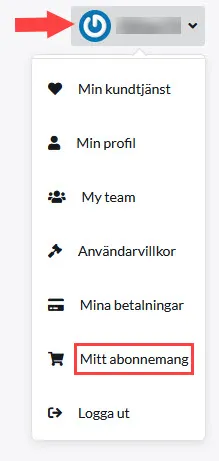
You can upgrade the subscription yourself whenever you want. It's quick and easy and can be done directly in the shop. Upgrade from GO to PLUS, or GO/PLUS to PRO.Here's what you do:1) Log in as usual (must be done by the shop owner)2) Click on your name in the top right corner3) Click on My subscription4) Click Switch to this package for the subscription you want to switch to. When a green box appears around the package, you have selected it:5) Go to the bottom of the page and select Proceed to payment6) Extend as usual by choosing card or invoice**You now pay the difference between e.g. PLUS & PRO, and only for the period, you have left of your current subscription.Done!To downgrade a subscription, i.e. change from e.g. PLUS to GO, please contact customer service.If you have problems renewing a subscription, check that your profile contains both company name and VAT number, then try again.
-
Delete an administrator
27 Nov 2025
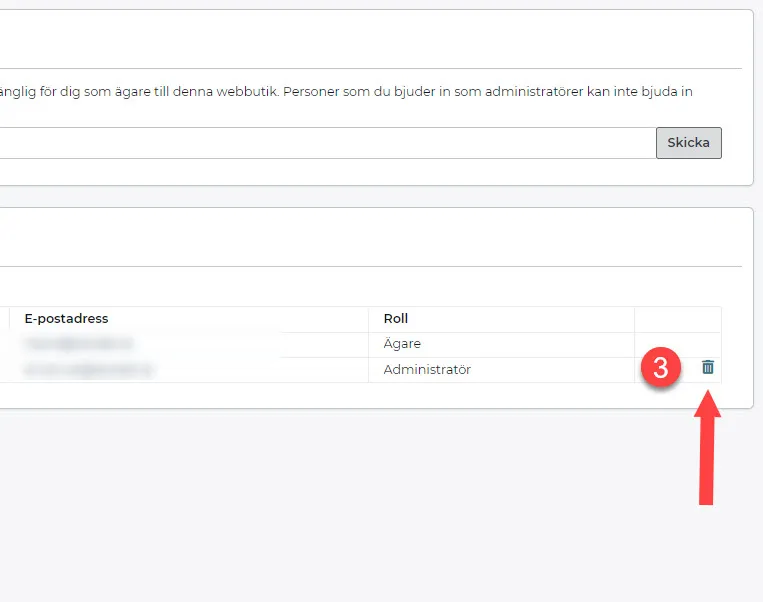
If you are the owner of a shop, you can delete & add administrators.How to delete an admin account in your shop 1) Log in to admin - https://www.abicart.se/ 2) Go to Settings >> Administrators. 3) Click on the trash can icon to delete. (If you change your mind after deleting an admin, you will have to send them a new invitation)
-

Change of ownership
27 Nov 2025
If your shop is changing hands, follow the list below.To-do list:1) Current owner invites incoming owner to create admin account under Settings >> Administrators. Link to manual: Add a new administrator 2) The new owner fills in their contact details on their new account. 3) The current owner sends a message to Abicart customer service from their owner account, stating which admin account should become the new owner: - Administrator's email- Store ID The transfer will be completed immediately as soon as the request is processed. Send the request only when you want the change to be made. *A transfer agreement is drawn up between the old and new owner on their own. The agreement does not need to be sent to Abicart. 4) Abicart customer service updates the store so that the new administrator account (incoming) becomes the store's owner account. The old owner remains as the administrator. The new owner can now invite new administrators and remove already added administrators. Read more here:Link to manual: Add a new administratorLink to manual: How to delete an administrator 5) New owner reviews company information and makes sure store and admin are updated with correct informationSettings >> Store informationMy profileFooter in the themePages such as "Terms & info"Done!*Please note that your admin account is personal and can be linked to multiple stores. Do not hand over your admin account. A new administrator will instead be invited to their own account via "Add a new administrator".
-

Add a new administrator
27 Nov 2025
If there are several of you working with the shop, you will need several admin accounts. The owner of a shop can add an account for a new user.Adding an account for a new userClick on Settings -> AdministratorsEnter the new administrator's email address, then click Submit.